Sale up to 40% on Cameras

Title

Free shipping on all orders!

Ring Always Home Cam

5369 reviews

$69.00
$129.00
- 47% off

International Delivery

Fast Shipping

Secure Payment

100% Money Back

Technical details

Dimensions

Camera Dimensions: 7.50 in. x 7.50 in. x 5.52 in. (191mm x 191mm x 140mm)
Charging Dock Dimensions: 7.50 in. x 7.50 in. x 4.74 in. (191mm x 191mm x 121mm)

Color

Camera: Charcoal
Charging dock: White

Video

1440x1440 HD, In-Flight Live View during flight

Field of view

120° horizontal, 120° vertical

Power

Built-in rechargeable battery with included charging dock. Charging dock includes a 120V-220V USB-C power adapter.

Connectivity

Dual-band wifi 2.4GHz and 5GHz

Operating conditions

32°F to 100°F (0°C to 40°C)

What's Inside

 What's Inside the Ring Always Home Cam?

The construction of this device is a sophisticated blend of a smart robot vacuum and a mini drone.

1. Camera & Sensor System (The "Eyes")

1440p Camera Module: A high-definition, wide-angle image sensor specifically tuned for indoor lighting conditions.

LiDAR & ToF (Time-of-Flight) Sensors: These act as the primary navigation system. They emit tiny laser pulses to measure distances to walls, furniture, and people, enabling real-time obstacle avoidance.

Downward-facing Sensors: These help the drone determine its altitude and pinpoint the exact position for a precision landing onto its dock.

2. Propulsion System (The "Flight")

4 Brushless Motors: High-efficiency, durable motors that provide stable flight, though they are the source of the device's distinctive humming sound.

Enclosed Propellers: The blades are fully encased within a plastic shroud. This is a critical safety feature to prevent damage to furniture or injury to pets and humans in case of contact.

Gyroscope & Accelerometer: An internal stabilization system that ensures the video feed remains smooth and steady while the drone is in motion.

3. The "Brain" (Processing)

Onboard AI Processor: Powerful enough to handle local mapping. It processes the layout of your home locally on the device rather than sending floor plans to the cloud, enhancing privacy.

Wi-Fi/Bluetooth Chips: Facilitates communication with the Ring app and enables seamless live video streaming.

4. Charging Dock (The "Base")

Physical Privacy Shutter: When docked, the camera unit slides into the base, physically blocking the lens. This ensures 100% privacy when the device is not in flight.

Fast-Charging Circuitry: Quickly recharges the small internal Li-ion battery after its typical 5-minute flight cycle.

📦 In the Box (Unboxing)

Typically, when unboxing this product, you will find:

Always Home Cam Unit.

Charging Dock.

Power Adapter and Cable.

Mapping Guide (Crucial for the initial setup where you manually "teach" the drone the layout of your home).

Fun Fact: There is no microphone or speaker inside the device for two-way talk. Ring omitted these to save weight for longer flight times and to address potential eavesdropping concerns.

How to use

Here is the professional English translation for the "How to Use" guide, tailored with technical precision:

🚀 How to Use the Ring Always Home Cam

Setting up this device is a unique experience. Unlike traditional cameras, it requires a "training phase" to familiarize the drone with your home's layout.

Step 1: Position the Docking Station

Central Location: Place the dock in an open area with a strong Wi-Fi signal.

Flat Surface: Ensure the dock sits on a level, sturdy surface to allow for precision landings.

Clearance: Maintain at least 3 feet (1 meter) of open space around the dock to give the drone enough room for takeoff and approach.

Step 2: Manual Map Training

This is the most critical step. The drone does not instinctively know your home; you must teach it.

Handheld Walkthrough: You will literally hold the drone in your hands and walk it through the specific paths you want it to patrol later.

Labeling Paths: Create specific routes in the app, such as "Check the Kitchen," "Front Door Patrol," or "Full Downstairs Loop."

Obstacle Learning: During this walk, the sensors map out permanent fixtures like walls and furniture.

Step 3: App Configuration (Ring App)

Sync the device with your Ring account over Wi-Fi.

Review your saved maps. You can set up "In-flight Zones" and "No-Fly Zones" to keep the drone away from private areas or tight spaces.

Step 4: Daily Operation

You can trigger the drone in three ways:

On-Demand: Open the Ring app, select a saved flight path, and tap "Fly." You will see a live video feed as it navigates.

Linked Events: Connect the drone to your Ring Alarm system. For example, if a back door sensor is tripped, the drone will automatically take off to investigate the area.

Scheduled Patrols: Set the drone to perform routine checks while you are at work or on vacation.

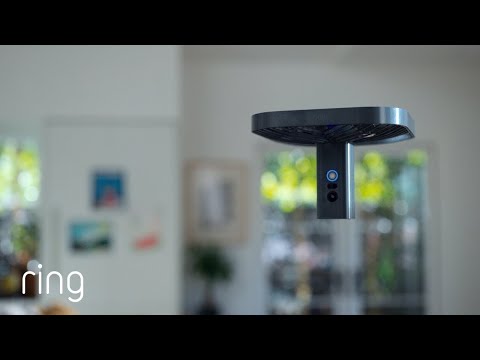
A new kind of camera. That flies.

Some indoor cameras just monitor the room. Ours can move around it when you’re away. Check in on command, or see what’s happening when Ring Alarm1 is triggered. Now you can be in two places at once.

Alt image

Introducing Always Home Cam

The world’s first flying indoor security camera for your home.

Security on command

Create preset flight paths to choose where your Cam will fly when you’re not at home.

Or when it’s triggered

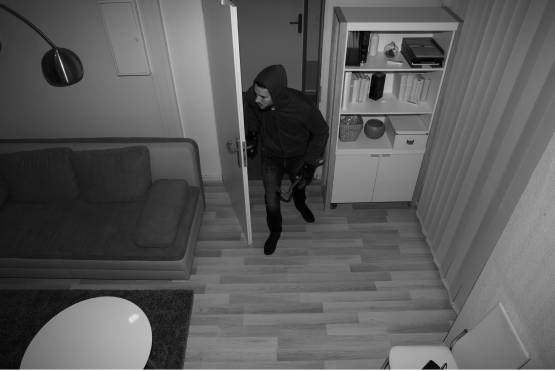
If your Ring Alarm contact sensors or motion detectors are triggered, Always Home Cam can automatically fly to see what’s happening.

See inside home
from anywhere

See live HD video of each flight in the areas you’re monitoring.

One camera. Every angle.

Innovation takes flight

Equipped with navigation sensors, Always Home Cam moves safely inside your home – giving you a flexible point of view when you’re away.

Protects your home and your privacy

Always Home Cam was built with privacy and security both top-of-mind. The camera stays blocked when docked and only records when it leaves the dock to fly on a preset path customized by you.

Control from anywhere with the Ring App

Check in on home at any time from anywhere, get real-time video streaming with In-Flight Live View, and customize important security settings. Get even more out of your Ring devices with a Ring Protect subscription to review, save, and share your flight paths and moments you missed at any time.

Connects with Ring Alarm.

Security and privacy controls.

Learn more here.

Ring Protect Plans.

Learn more here.

What Our Customers Are Saying

Frequently asked questions

Can Always Home Cam be used outdoors?

No. Always Home Cam is designed for indoor use only.

How does Always Home Cam work with other Ring devices?

Always Home Cam is compatible with Ring Alarm Security System and Ring Alarm Pro Security System, which is sold separately. Train and trigger Always Home Cam to fly along specific flight paths whenever your Alarm contact sensors or motion detectors are triggered when in Away Mode. Always Home Cam does not currently work with other Ring devices outside of Alarm products.

What are the ways I can program Always Home Cam to take flight?

You can initiate a flight path directly from your Ring App or link Always Home Cam to fly once the Ring Alarm contact sensors or motion detectors are triggered when in Away Mode. Ring Alarm is required for motion-initiated flights.
 

Can I manually intervene when Always Home Cam begins to fly?

Unlike a traditional drone, Always Home Cam only flies along preset flight paths and does not allow users to manually intervene during flight. Once it is in flight, you’ll have the option to pause, resume, rotate, or end the flight. Other than returning the camera to the charging dock, you will not be able to alter the flight path mid-flight.

Are there any limitations to the flight paths I create?

Always Home Cam can accommodate up to 50 different flight paths. A single flight path can be up to 5 minutes. Always Home Cam can only operate on a single story of a home at a time. If you wish to have flight paths on multiple stories, you will need to purchase a separate Always Home Cam for each story of your home you want it to fly on.

What happens if there’s a new obstacle in the way of the preset flight path?

If Always Home Cam encounters an unexpected obstacle, it will pause and return to the charging dock. You will also receive a push notification that the flight was not able to be completed.

Can Always Home Cam fly directly from one flight path to another?

For your privacy, Always Home Cam can only fly along the exact flight paths you determined when setting up the device. Each flight path is treated individually. If you wish to check in on multiple paths, Always Home Cam will return to its charging dock and, if necessary, recharge before taking off on another flight path.
 

How long can Always Home Cam fly before needing to recharge?

Always Home Cam can fly up to 5 minutes before needing to recharge. 

Can I configure Always Home Cam to be used with multiple charging docks?

No. Each Always Home Cam can only be used with a single charging dock.

Is Always Home Cam safe to use with pets?

Like any new device, your pets may need time to adjust to the noise and motion of Always Home Cam. When you’re not home, before operating Always Home Cam, secure pets in a location away from the charging dock, the device, and its flight paths.

Is Always Home Cam loud?

Always Home Cam is intended for use when no one is at home. It is about as loud as a vacuum or a blender during flight.

Ring Always Home Cam

$69.00
$129.00
- 47% off